Service Catalogs Demo
This demo walks you through creating and deploying a Service Catalog — a way to package Apache Camel routes as tools that AI agents can use through Wanaku.
What You Will Learn
- How to create a Service Catalog with Apache Camel routes
- How to expose Camel routes as MCP tools
- How to deploy a Service Catalog to the Wanaku router
What You Will Need
- Wanaku CLI installed (download from releases page)
- Wanaku running via
wanaku start local(see Getting Started)
Architecture Overview
┌─────────────────┐
│   AI Agent      │
│  (Claude, etc)  │
└────────┬────────┘
         │ MCP Protocol
         ▼
┌─────────────────┐
│ Wanaku Router   │
│  (MCP Server)   │
└────────┬────────┘
         │
         ▼
┌─────────────────┐
│ Service Catalog │
│ (Camel Routes)  │
└────────┬────────┘
         │
         ▼
┌─────────────────┐
│ External System │
│ (API, Kafka,    │
│  Database, etc) │
└─────────────────┘
Step 1: Initialize a Service Catalog
Create a new Service Catalog:
cd /tmp
wanaku service init --name=demo-catalog --services=books
This creates:
demo-catalog/
├── index.properties
└── books/
    ├── books.camel.yaml
    ├── books.wanaku-rules.yaml
    └── books.dependencies.txt
Step 2: Define a Camel Route
Edit books/books.camel.yaml and replace the contents with:
- route:
    id: get-book-by-isbn
    description: Retrieve book information by ISBN
    from:
      uri: direct:get-by-isbn
      steps:
        - setHeader:
            name: CamelHttpMethod
            constant: GET
        - log:
            message: "Fetching book with ISBN: ${body}"
        - toD:
            uri: "https://openlibrary.org/api/books?bibkeys=ISBN:${body}&format=json&jscmd=data"
        - convertBodyTo:
            type: String
        - log:
            message: "Book data received: ${body}"

- route:
    id: search-books
    description: Search for books by title
    from:
      uri: direct:search-books
      steps:
        - setHeader:
            name: CamelHttpMethod
            constant: GET
        - log:
            message: "Searching for books with query: ${body}"
        - toD:
            uri: "https://openlibrary.org/search.json?q=${body}&limit=5"
        - convertBodyTo:
            type: String
        - log:
            message: "Search results received: ${body}"
Note: These routes use the Open Library API, which is free and doesn't require authentication.
You can use a visual editor suck as [Kaoto](https://kaoto.io) or
Camel Karavan to design and edit Camel routes.
Step 3: Add Dependencies
Edit books/books.dependencies.txt and add:
org.apache.camel:camel-http:4.18.2
org.apache.camel:camel-jackson:4.18.2
Step 4: Expose Routes as Tools
Generate the Wanaku rules from the route IDs:
wanaku service expose --path=demo-catalogThis scans the Camel routes and generates books/books.wanaku-rules.yaml:
# Auto-generated Wanaku rules for books
# Generated by 'wanaku service expose'
mcp:
  tools:
    - get-book-by-isbn:
        route:
          id: "get-book-by-isbn"
        description: "Invoke route get-book-by-isbn in books"
        properties:
          - name: wanaku_body
            type: string
            description: The greeting message to send
            required: true
    - search-books:
        route:
          id: "search-books"
        description: "Invoke route search-books in books"
        properties:
          - name: wanaku_body
            type: string
            description: The greeting message to send
            required: true
Step 5: Deploy the Service Catalog
Deploy the catalog to the Wanaku router:
wanaku service deploy --path=demo-catalog --host=http://localhost:8080Step 6: Download and Run the Camel Integration Capability
The Service Catalog contains Camel routes, but something needs to actually run them. That is the Camel Integration Capability — a standalone service that executes the routes and registers itself with the Wanaku router.
Download the jar from the releases page:
wget https://github.com/wanaku-ai/camel-integration-capability/releases/download/v0.2.0/camel-integration-capability-main-0.2.0-jar-with-dependencies.jarOption A: Use the Wanaku UI
Open the Service Catalog page at http://localhost:8080/admin/#/service-catalog, find demo-catalog, and click Deploy.
Option B: Get instructions from the CLI
wanaku service instructions --name demo-catalog --model=localThis prints the exact command you need. For a local setup it looks like:
java -jar camel-integration-capability-main-0.2.0-jar-with-dependencies.jar \
  --registration-url http://localhost:8080 \
  --registration-announce-address localhost \
  --grpc-port 9190 \
  --name books \
  --client-id wanaku-service \
  --service-catalog demo-catalog \
  --service-catalog-system books \
  --fail-fast
NOTE
Authentication flags (--client-secret) is not needed when running with wanaku start local, since auth is disabled.
Run that command in a separate terminal. After a few seconds the capability service registers with the router and the tools become available.
Step 7: Verify
Open the Wanaku Admin UI at http://localhost:8080/#/service-catalog. You should see demo-catalog listed with 2 services.
Verify via CLI:
wanaku tools listYou should see:
name             namespace type  uri                      labels
get-book-by-isbn default   books books://get-book-by-isbn {}
search-books     default   books books://search-books     {}
Testing the Tools
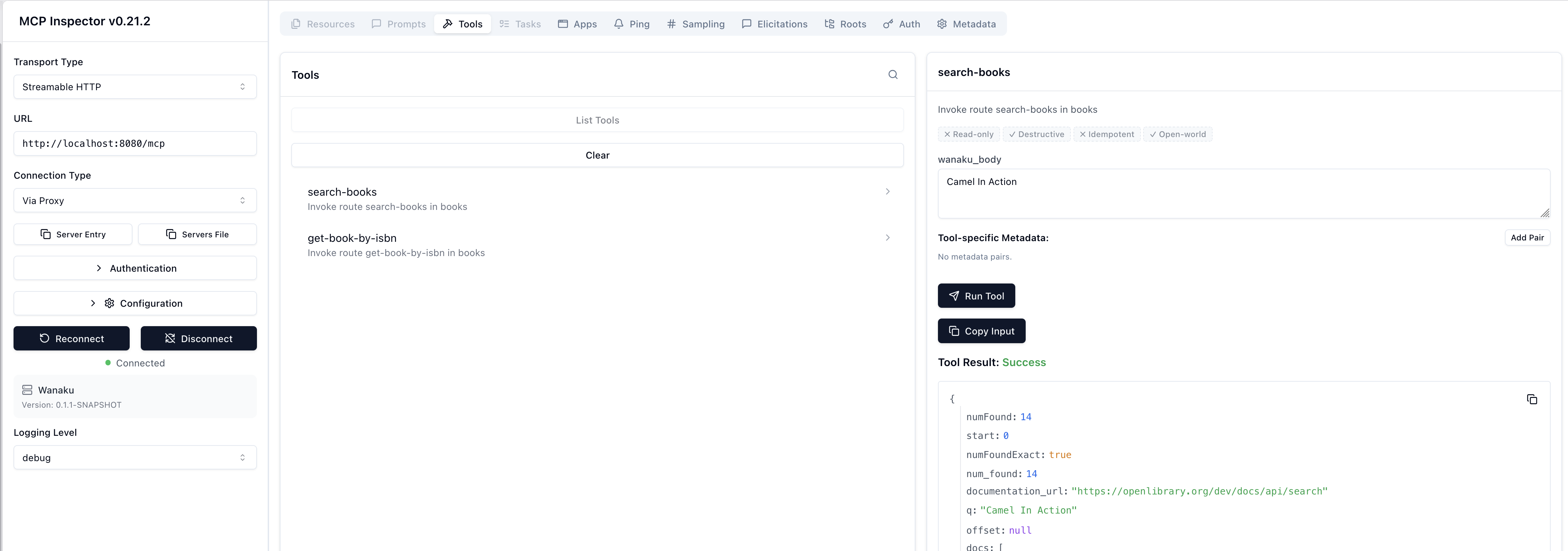
You can use the MCP Inspector to test the tools interactively:
npx @modelcontextprotocol/inspectorTry invoking get-book-by-isbn with:
{
  "wanaku_body": "9781935182368"
}
The tool should return details for Camel in Action from the Open Library API.

You can also try search-books:
{
  "wanaku_body": "Camel In Action"
}
What's Next?
- Learn how to use and create Service Templates for reusable integration blueprints
- Read the Service Catalogs Guide
Troubleshooting
Service Catalog deployment fails
- Verify the
index.propertiesfile is correctly formatted - Check that all file paths in
index.propertiesmatch actual files - Ensure the Wanaku router is running and accessible
Tools not appearing after deployment
- Refresh the Admin UI (hard refresh: Ctrl+Shift+R)
- Check the Wanaku router logs in the terminal running
wanaku start local
Camel route fails with "component not found"
- Verify the dependencies are correctly listed in
dependencies.txt - Check that the Maven coordinates are valid and the version exists
If you find a bug, please report it.